Studio 6B
Names
Open questions.md and list the names of everyone in your group.
Instruction Encoding
Binary Encoding
Using Appendix B identify the 32-bit binary representation of the instructions (show work and answers in questions.md). Write out the final answer in hexadecimal (8 digits of hex = 32 bits). Note that the last three have a lot of similarity. Show your final results in questions.md
Patterns
The examples below are deliberately selected to try to make it easy to reuse concepts from one to the next.
Do not spend more than 10-15 minutes on this. If it takes you longer, move on to the next part(s).
ori s0, s1, 32or s0, s1, s2and s0, s1, s2add s0, s1, s2
Encoding Conveniences
ALU operation selection: Review the description of the ALU from Homework 5a. There is a way to select bits from instructions to make the ALU do the corresponding operation. Briefly describe what bits may be candidates to identify when the ALU should do add, or, and and operations.
Immediates: In addition to being organized to facilitate selecting operations, instructions are organized to facilitate identification of the “immediate” instructions, like ori vs. the register-only variations, like or. Which bit(s) may be being used for this purpose? Quickly compare some pairs of instructions, like ori and or, andi and and, addi and add, etc. to see if there’s a distinguishing feature.
Debugging and Explaining
J, a junior programmer at SH Enterprises, has been (unsuccessfully) trying to identify and understand a particular bug for a few weeks. They’ve applied a pseudo “Wolf Fence Debugging” approach:
The “Wolf Fence” method compels attention to that portion of the program containing the error. It is described as follows:
- Somewhere in Alaska there is a wolf.
- You may build a wolf-proof fence partitioning Alaska as required.
- The wolf howls loudly.
- The wolf does not move.
The procedure is then:
- Let
Abe the territory known to contain the wolf (initially all of Alaska).- Construct a fence across
A, along any convenient natural line that dividesAintoBandC.- Listen for the howls; determine if the wolf is in
BorC.- Go back to Step 1 until the wolf is contained in a tight little cage.
At this point they have barely any code left, but it still doesn’t work like they expect. They’ve also added logging to try to understand the problem. They are using Environment Call (ecall) 4 to print (log) messages, which can help understand the flow of execution.
Log messages are shown in the Venus Terminal, like in the below (but these aren’t the messages for this program):
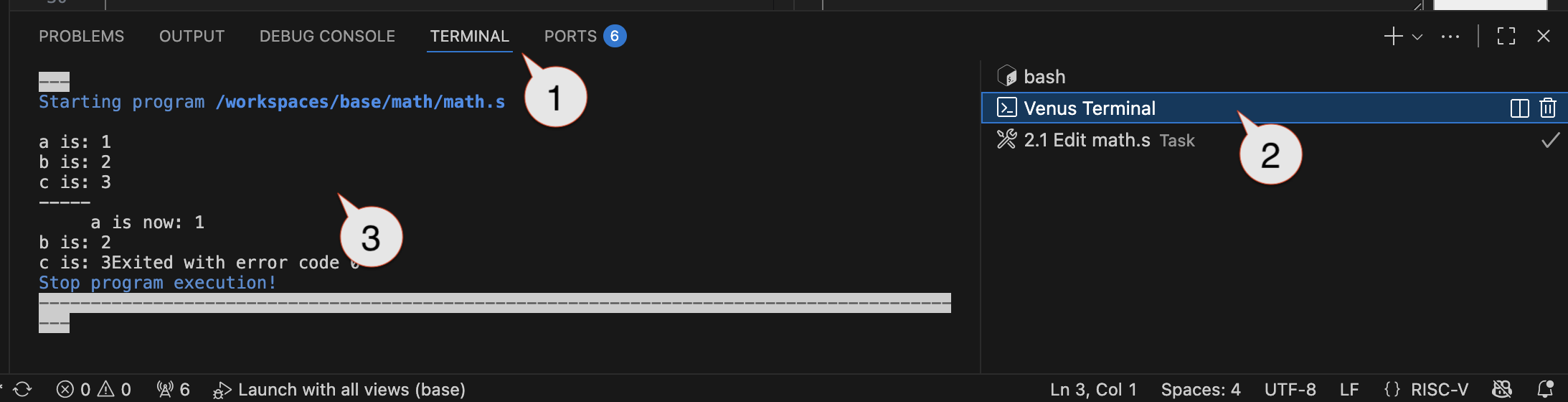
Look at (but don’t run) the code in buggy.s. Briefly describe what J (the programmer in question) probably expects the code to do. (Answer in questions.md)
- You may want to try to look at the places where there is an
ecalland the 2-3 instructions/symbols around them to identify where J put in the print messages and what each will print. - Then try to identify the overall order that they will print, the number of times each will print, etc.
SH Enterprises has asked that you review the code and provide J with a careful and detailed summary of what is going wrong, why, and how it can be avoided in the future. (You may need to run the code, identify what happens, and how to fix it. J requires a lot of detail and evidence, so you should provide as much detail as possible, like “register X is Y, but should be Z…and here’s why it needs to be Z for the desired behavior and why Y leads to the current behavior”) (Answer in questions.md) It may be best to:
- Run the program and see if it behaves as expected
- Step through instruction-by-instruction to understand the overall behavior.
- Clearly identify where the actual behavior may deviate from what may have been expected. (That is, what’s going wrong)
- Then try to understand why it’s going wrong. You may want to carefully look at the registers involved and how their values change over time. You may also want to review all instructions that change them, how/why they are changed, and what they need to be to get the desired behavior.
Arrays and Labels
The numberstats.s file includes a declaration:
arr: .word 1,2,3,-4,5,6,2
The entire memory can be thought of as a giant array of bytes. The .word declares a list of 32-bit words: This is creating an array of 7, 32-bit (or 7, 4-byte) values. The label array is just a symbol that represents where in memory the array will be stored.
Memory
Memory itself is a giant array. array is just an index into the entire memory of where this particular chunk of data starts.
Complete the stats function as described in numberstats.s. It will be provided an array in a0. The lw command can be used to retrieve array elements, each of which is 1 word (4 bytes).
After completing stats, change the list of values in arr, which is being used as the test case. Confirm that stats continues to work with different values, more values, and fewer values.
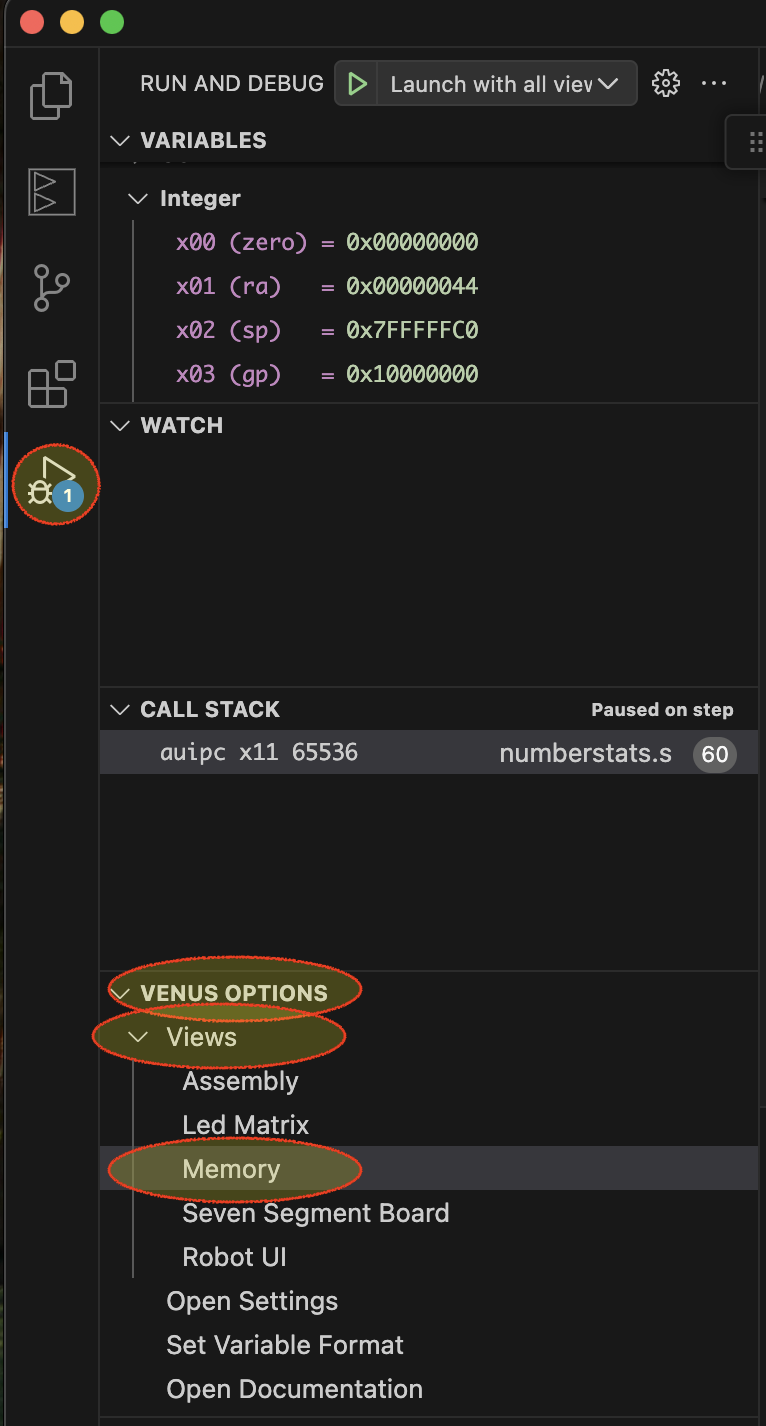
Put a breakpoint on la t0, arr (in main) and run the code until the breakpoint. Use the panel to view register values to identify the values of a0 and a1, which represent the values of arr (i.e., arr is a number) and arr_end (set by the two instructions prior to your breakpoint). These numbers are indices into RAM. Use the Memory view to browse through the memory. Go to the address for arr and confirm that you see the current contents shown in the .arr: .word list at the top of the file. (Answer in questions.md)
Labels, Pointers, References, Indices
Different programming languages use different terminology for the concept represented by a label. C and C++ generally call them “pointers” because they point to the location of some piece of data or code of interest. Java uses the concept of a “reference variable” in a similar way. The generally all represent the concept of an index into the entire array of memory, where that index is the start of some data or code of interest.
Briefly explain how the values in arr are shown in the memory view and suggest ways you can use this view to understand memory operations. (Answer in questions.md)
Add a breakpoint on the li a0, 4 that is immediately after the la a1, s_min and run to this breakpoint. At this point a1 represents the location of s_min. The s_min label refers to data declared as .asciiz — ASCII stands for “American Standard Code for Information Interchange”, which is a common code to represent English language characters. Here’s a table of codes and their meanings: https://www.asciitable.com/. Use the memory viewer and to see where and how s_min’s data is stored in memory.
Explain how s_min data is stored and any differences compared to the arr data. (Answer in questions.md)
Weird
DO NOT EXECUTE weird.s (YET). weird.s contains a recursive function. Read through it and try to identify what it will do. (Answer in questions.md)
Run weird.s and describe what is does / did. (Answer in questions.md)
Now explain how and why it did what it did. This requires a clear understanding of how memory behaves. (It prints some terms when run. If you’re not familiar with them, you may want to look them up first)
Submission / End-of-class: Commit And Push
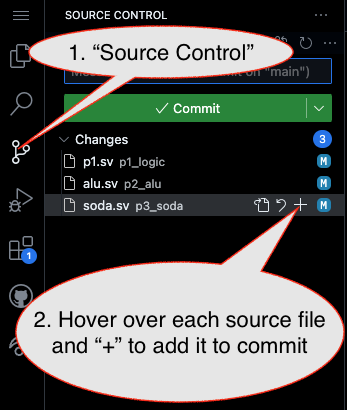
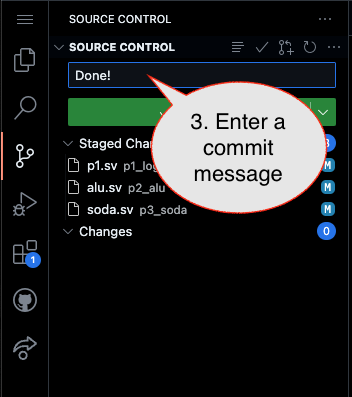
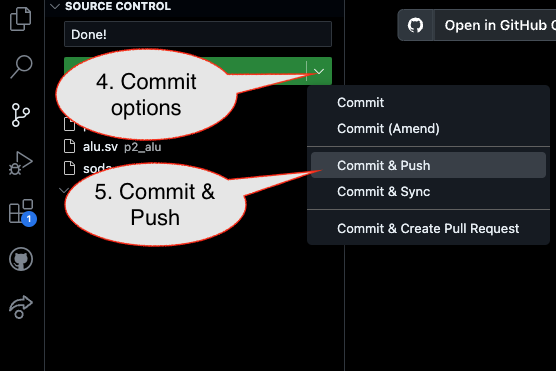
1. First, be sure to commit and push files to GitHub (as shown in studio)
1.1
1.2
Caution!
Failure to type in a commit message will cause VSCode to open a window to enter the message (in the editor area) and the Source Control pane will appear to be stuck (a waiting animation) until you type in a message and close the message pane.
1.3
2. Then go to GitHub.com and confirm the updates are on GitHub
End of Studio: Stop the Codespace
Caution!
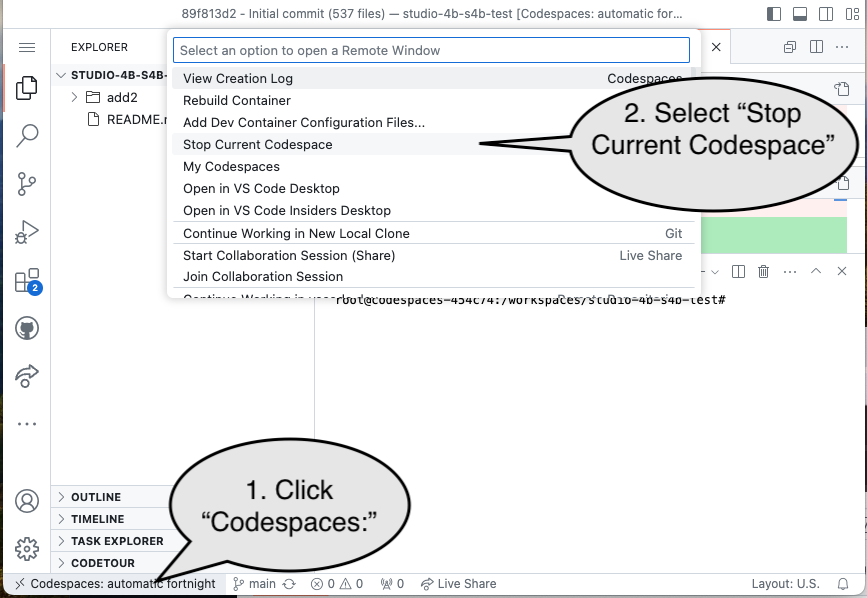
Be sure to “stop” your Codespace. You have approximately 60 hours of Codespace time per month. Codespaces often run for ~!5 minutes extra if tabs are just closed.